Contrast AI SmartFix
法的免責事項
Contrast AI SmartFixをご利用になる場合、お客様のコードおよびその他のデータは、お客様が選択するLLMに送信されることに同意するものとします。LLMへのデータ送信およびLLMによって生成された出力は、いずれも当該Contrast AI SmartFixLLMの利用規約が適用されます。Contrast AI SmartFixの利用は、完全に自己責任となります。
Contrast AI SmartFixは、脆弱性修正のプロセスを効率化するために設計されたAI搭載エージェントです。Contrast ASTテクノロジ(Contrast Assess)で検出されたセキュリティ脆弱性に対するコード修正案を自動的に作成します。このエージェントは、GitHub Actionsによって既存のワークフローにシームレスに連携でき、修正案を含むプルリクエスト(PR)を自動生成します。
SmartFixの利点
脆弱性修正の自動化:SmartFixを利用することで、 脆弱性の修正に通常必要な手作業と時間を大幅に削減できます。
開発者重視:このツールは、開発者向けに設計されています。修正はGitHubリポジトリ内のプルリクエストとして直接送信されます。この機能により、既存の開発ワークフローにそのまま適用させることができます。
Runtime context: By using the runtime analysis from Contrast IAST technology (Assess), SmartFix can provide more accurate and relevant code fixes.
SAST source mapping: For SAST findings, SmartFix uses the file path and line number from the static finding to locate and fix the target code.
SmartFixの主な機能
BYOLLM(Bring Your Own LLM):SmartFixでは、お客様がご希望の大規模言語モデル(LLM)プロバイダーとモデルを使用できます。
設定可能なPRスロットル:
max_open_prsという設定にパラメータを指定して使用することで、SmartFixが自動で作成するプルリクエストの件数を制御できます。ビルドコマンドの連携:生成された変更が正常にビルドできるようにするために、
build_commandを指定します。エージェントによって既存のテストが中断されないよう、ここで指定するコマンドでテストも実行できることが望ましいです。コードのフォーマット設定:プロジェクトで特定のコードフォーマットが必要な場合は、
formatting_commandを指定することで、生成されたコードがプロジェクトのスタイルガイドに従うようにすることができます。このコマンドは、ビルド実行前に使用して下さい。デバッグモード:
debug_modeをtrueに設定することで、GitHub Actionsの出力でより詳細なログを記録できます。サポートされている言語: Java、.NET Core、.NET Framework、Node.js、Python。
Operate in SAST-only mode: If your organization uses NorthstarNorthstar for static analysis (SAST), SmartFix can operate in SAST-only mode. To do this, omit the
contrast_app_idandcontrast_app_idsinputs from your workflow configuration. SmartFix will target SAST findings from NorthstarNorthstar rather than IAST findings from Contrast Assess. A Contrast account and organization ID are still required.
ContrastにおけるSmartFixのステータス変更
対比:それぞれの脆弱性について、SmartFixプルリクエスト(PR)を開くか、プルリクエストがマージされると、Webインターフェースの脆弱性ページの「ノート」タブに次の内容が表示されます。SmartFix PR へのリンクを含むアクティビティ。
Northstar各イシューでは、SmartFix がプルリクエスト (PR) を開くか、またはプルリクエストがマージされると、イシューの詳細ビューのアクティビティタブには、PR へのリンクを含む SmartFix アクティビティが含まれます。
脆弱性または問題のステータスは SmartFix 修正済み に変更されます。
SmartFix activity dashboard
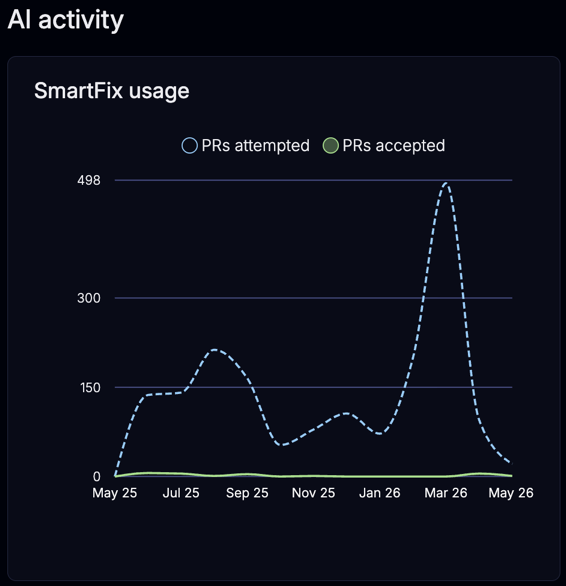
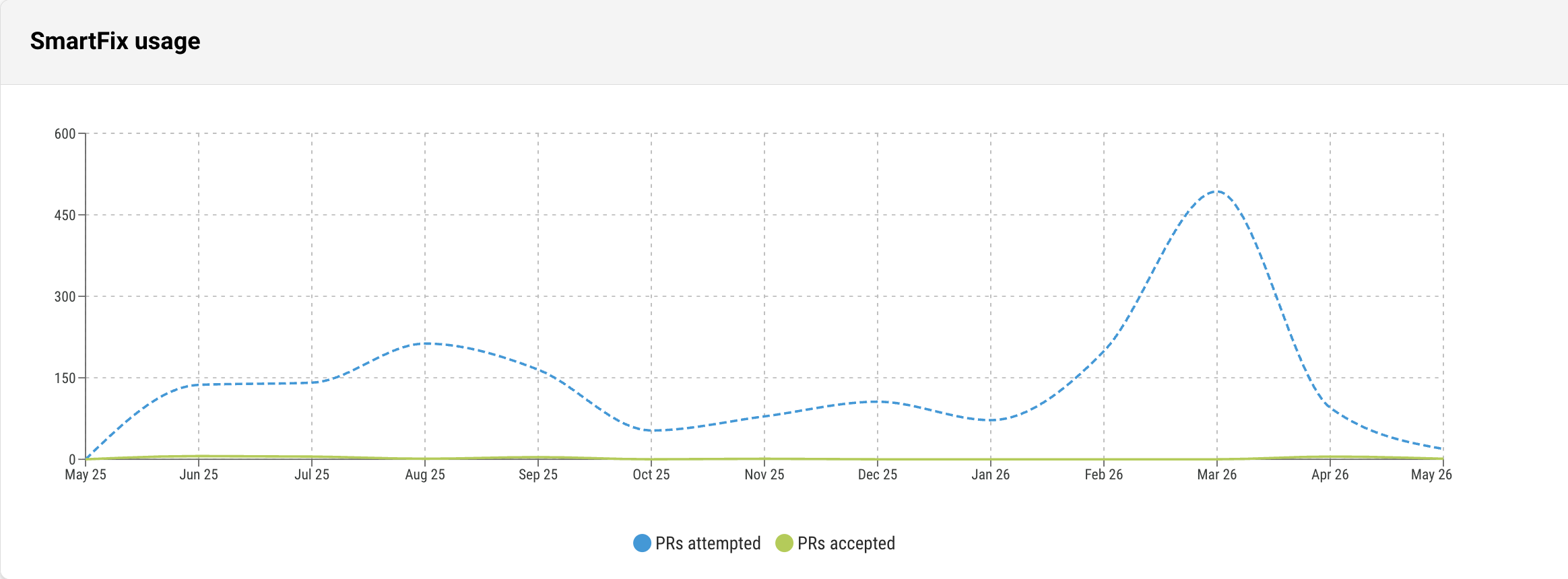
AppSec managers can view a SmartFix usage chart in the Organization Settings page of the Contrast web interface. The chart shows monthly pull request (PR) activity for your organization over the past 12 months so that you can track adoption and report on remediation value. The X-axis spans the current partial month plus the 12 preceding complete calendar months. Months with no activity appear as zero values.
注記
Any user with the View permission on the Organization can see the SmartFix activity chart. No additional role is required.
To find the chart:
Northstar: The SmartFix activity chart appears as a widget in the Insights area
Contrast: In the Organization settings, scroll down to the SmartFix activity chart
The chart only appears when your organization has SmartFix data. If no SmartFix runs have occurred, the chart is not displayed.
The chart shows PRs attempted versus accepted and the line chart displays two data series every month:
PRs created (PRs attempted): the number of pull requests that SmartFix opened in that month
PRs accepted (PRs merged): the number of those pull requests that were merged